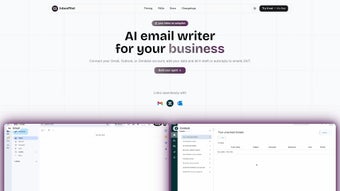

Download InboxPilot – AI‑Powered Email Management Tool for Faster, Smarter Replies
Overview
InboxPilot is a web‑based AI writing assistant specifically built to transform the way professionals handle their email inboxes. By harnessing advanced chatbot technology, InboxPilot automates routine tasks such as drafting replies, summarizing long threads, and scheduling follow‑ups. The platform works directly within your existing email environment—whether you’re using Gmail, Outlook, or a corporate mail server—so you never have to switch applications to benefit from its intelligent suggestions.
Because it learns from your past interactions, the tool becomes increasingly personalized, delivering responses that match your tone, style, and preferred level of formality. For busy executives, sales teams, customer‑support agents, and anyone who spends a significant portion of the day reading and answering emails, InboxPilot promises a measurable boost in productivity. The subscription model includes regular updates, security patches, and access to new AI features as they are released.
In short, InboxPilot is not just another email add‑on; it is a strategic productivity partner that helps you save time, reduce inbox fatigue, and communicate more effectively.
Key Features
- AI‑Generated Draft Replies: Instantly creates context‑aware reply drafts based on the content of the incoming message and your historical response patterns.
- Thread Summarization: Condenses lengthy email chains into concise bullet points, allowing you to grasp the conversation’s essence in seconds.
- Smart Follow‑Up Scheduler: Detects pending actions and suggests timely follow‑up reminders, which can be added to your calendar with a single click.
- Personalized Tone Calibration: Learns your preferred writing style—formal, casual, or brand‑specific—and applies it consistently across all drafts.
- One‑Click Integration: Works seamlessly with Gmail, Outlook, and most IMAP‑compatible services without requiring additional plugins.
- Data Privacy Controls: All email content is processed under strict encryption protocols, and you retain full control over what data the AI can access.
- Continuous Learning Engine: Improves suggestion accuracy over time by analyzing accepted and edited drafts.
- Multi‑Language Support: Supports English, Spanish, French, German, and several other languages, making it suitable for global teams.
Installation & Usage Instructions
Getting started with InboxPilot is designed to be as frictionless as possible, even for users who are not technically inclined. Follow these steps to begin automating your email workflow:
Step 1 – Create an Account
Visit the official InboxPilot website and click the “Start Free Trial” button. You’ll be prompted to enter a professional email address, create a secure password, and optionally link your Google or Microsoft account for single‑sign‑on convenience. After confirming your email, you’ll have immediate access to the web dashboard.
Step 2 – Connect Your Email Provider
From the dashboard, navigate to the “Integrations” tab. Choose your email service—Gmail, Outlook, or a custom IMAP server—and grant the necessary OAuth permissions. This process authorizes InboxPilot to read incoming messages and draft replies on your behalf, without storing passwords.
Step 3 – Set Your Preferences
In the “Settings” panel, you can define your preferred tone, select default signatures, and configure language options. There’s also a “Learning Mode” toggle that lets the AI start with a conservative suggestion style until it becomes familiar with your writing patterns.
Step 4 – Start Drafting
When a new email arrives, you’ll notice an “InboxPilot Suggest” button beside the reply field. Clicking it generates a draft that you can accept, edit, or discard. For long threads, use the “Summarize” button to receive a quick overview. Follow‑up reminders can be added by clicking the “Set Follow‑Up” icon, which syncs with Google Calendar or Outlook.
Step 5 – Review & Optimize
Periodically visit the “Analytics” section to see how many emails were auto‑drafted, accepted, or manually edited. This data helps you understand the AI’s impact and fine‑tune your preferences for even better results.
Compatibility, Pros & Cons
InboxPilot is a cloud‑based service, which means it works on any device that can run a modern web browser. Supported operating systems include Windows 10/11, macOS 10.15+, Linux distributions with Chrome/Firefox, as well as iOS 13+ and Android 8+ for mobile access through a responsive web interface. No additional software installations are required, and the service adheres to GDPR and CCPA standards for data protection.
Pros
- Reduces average email response time by up to 50 %.
- Seamless integration with major email platforms—no plugins needed.
- Highly customizable tone and language settings.
- Robust security with end‑to‑end encryption.
- Continuous AI learning ensures improving accuracy.
- Free trial available; affordable subscription pricing.
Cons
- Requires an active internet connection; offline functionality is limited.
- Initial learning curve for tone calibration may require a few days of usage.
- Subscription model may be a barrier for occasional users.
- Some enterprises may need additional compliance certifications.
FAQ & Final Thoughts
Is InboxPilot compatible with my corporate Outlook server?
Yes. InboxPilot supports Exchange Online and on‑premises Outlook servers via standard IMAP/SMTP protocols. You simply provide the server address and credentials during the integration step.
How does InboxPilot handle data privacy?
All email content is transmitted over TLS 1.3 and processed in memory without persistent storage. The platform complies with GDPR, CCPA, and ISO‑27001 standards, giving you full control over data retention policies.
Can I use InboxPilot on my mobile device?
Absolutely. InboxPilot’s web interface is fully responsive and works on iOS and Android browsers. You can draft replies, view summaries, and schedule follow‑ups from anywhere.
What subscription plans are available?
InboxPilot offers a monthly plan at $9.99 per user and an annual plan at $99 per user, which includes priority support and early access to new features. A 14‑day free trial is available for new accounts.
Will the AI ever suggest incorrect or inappropriate content?
While the AI is highly accurate, occasional mismatches can occur, especially with niche industry jargon. InboxPilot always presents drafts for your review before sending, allowing you to edit or reject any suggestion.
In summary, InboxPilot delivers a powerful blend of AI‑driven automation and user‑centric customization that can dramatically streamline your email workflow. By integrating directly with the email services you already use, it eliminates the need for clunky add‑ons while offering a secure, continuously improving assistant. Whether you’re a sales professional chasing timely replies, a manager juggling countless threads, or a support agent aiming for rapid ticket resolution, InboxPilot provides the tools to work smarter, not harder. Ready to reclaim hours hidden in your inbox? Download InboxPilot now and start your free trial today—experience the future of email management.
InboxPilot impresses with its intuitive UI and accurate AI suggestions. The learning curve is short, and the time saved on daily email triage is tangible. While the subscription cost may deter occasional users, power users and teams will find the ROI compelling. Overall, a solid addition to any productivity toolkit.
- Pros: Fast drafting, reliable summarization, strong privacy.
- Cons: Requires internet, subscription fee.






